
Condition grades#
| Grade | Meaning |
|---|---|
| Like new | Unused or barely used; no visible wear |
| Good | Light wear that does not affect use |
| Fair | Visible wear; the item is still fully usable |
| Worn | Heavy wear; damage must be disclosed |
The seller must answer whether the item has been cleaned and whether there are stains, holes, repairs or other damage. If damage is declared, they must describe it and its location.
Current photo requirement#
A listing needs at least one current photo that has finished processing before it can be submitted. Encourage sellers to show the front, back and any damage clearly. The current submission rule does not require separate front and back slots in every listing.
Use good light, keep the item visible and avoid unrelated images. The photos should support the chosen grade and damage description. Staff can ask for clearer photos or a close-up before approving.
File requirements#
Upload JPEG, PNG or WebP files up to 12 MB each. Encored checks uploaded files and removes embedded location metadata. Photo validation may reject unsuitable images when the validation service is configured.
Catalogue images and seller photos#
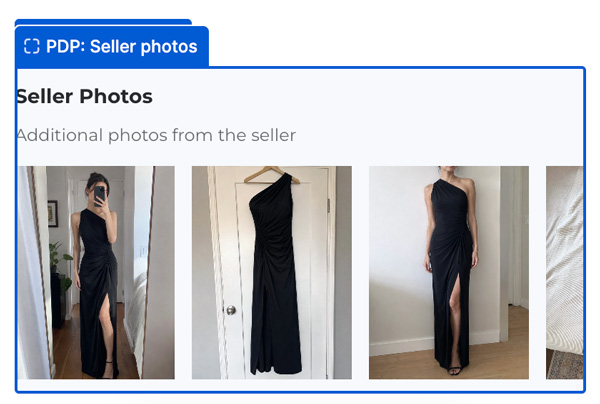
Catalogue images describe the original product. Seller-taken images document its current condition and appear in the separate Seller photos block. Do not treat a catalogue image as evidence of an individual item’s condition.
Review and corrections#
Check that the condition, notes and images agree. Use a change request when the seller can fix the submission. Staff can replace photos while a listing is in an editable state.